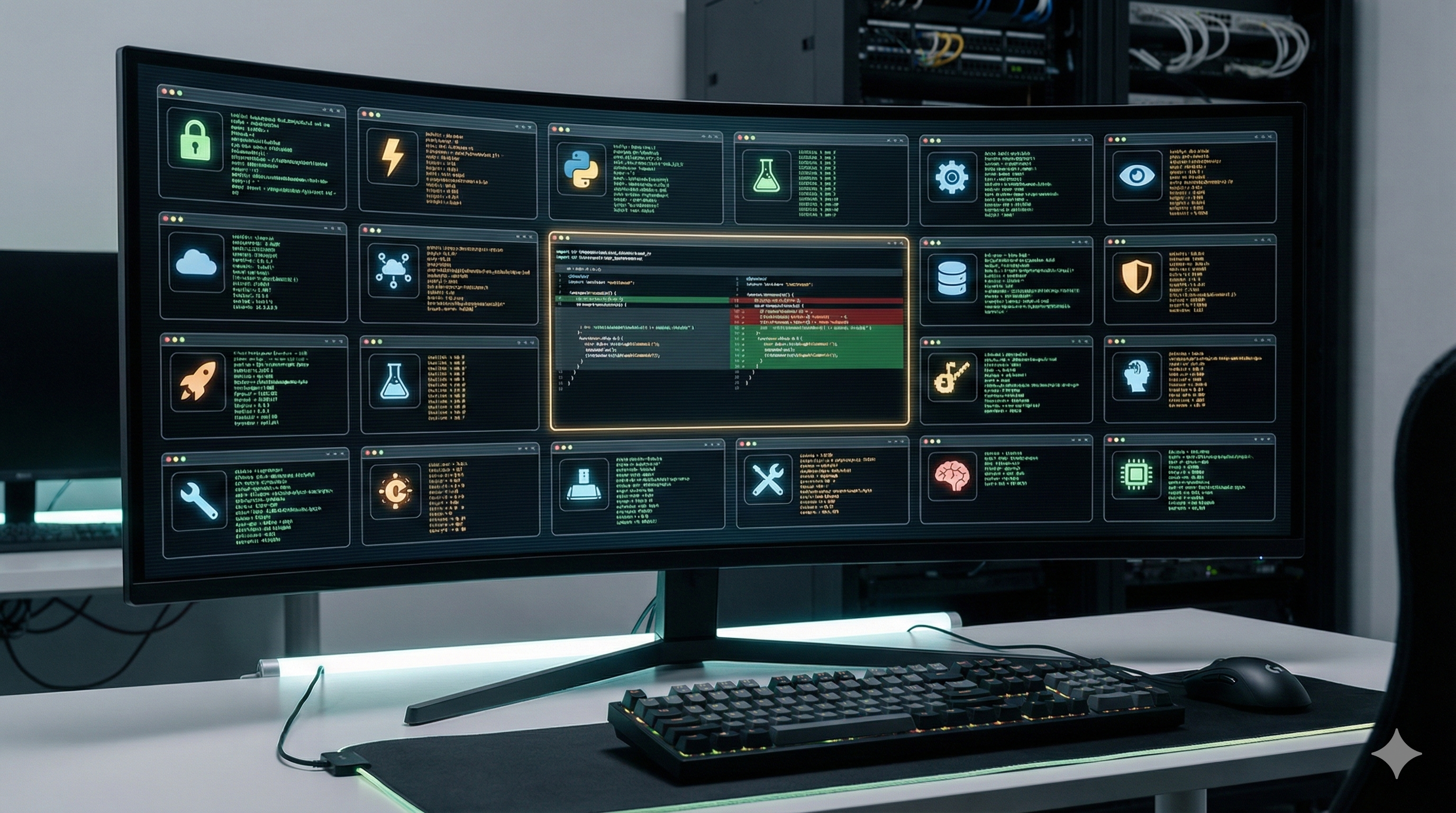
The 15-Expert Code Review Panel (With Context That Actually Works)
What if every pull request got reviewed simultaneously by 15 senior engineers—each a specialist in their domain? A security expert scrutinizing auth flows. A performance engineer hunting O(n²) loops. An API designer checking backward compatibility. A testing specialist probing for missing edge cases.
Sounds expensive. Sounds slow. Sounds like a fantasy.
I built it. It runs in under 2 minutes. It catches things humans miss.
And then it nearly drove us insane with false positives.
"Split-brain: multiple config sources detected. This is a code smell." The AI was confident. Authoritative. Wrong. I had two config sources because the design required it.
This is the story of how I created a 15-expert code review panel, discovered its critical flaw, and fixed it. The lesson: the AI itself is the easy part. Context is everything.
Part 1: The Problem with Single-Reviewer Code Review
Every reviewer has blindspots.
The security expert catches the auth bypass but misses the pandas anti-pattern that'll blow up in production. The performance engineer spots the O(n²) loop but doesn't notice the test that's skipping functionality on Windows instead of fixing the root cause. The Python expert flags the missing type annotation but doesn't realize it breaks the serialization contract with another service.
No single person holds the full picture. Context-switching is expensive. Senior engineers become bottlenecks. "LGTM" culture emerges when reviews become chores.
I had a PR that passed three human reviewers. Two weeks later, we discovered it introduced a subtle race condition in our async message handling. None of the reviewers specialized in async Python. The bug cost us 40 engineer-hours to diagnose.
What if I could get 15 specialists to review every PR, without the coordination overhead?
Part 2: The Architecture—Parallel Expert Dispatch
The core insight: AI agents are cheap to spawn, expensive to wait for sequentially.
If you run 15 reviews one after another, you're looking at 10+ minutes. Run them in parallel? Under 2 minutes total.
The implementation depends on your AI setup—whether you're using OpenAI's API, Claude, an agent framework, or something else. The key is firing all 15 prompts simultaneously and collecting the results.
The parallel dispatch isn't just about speed—it's about isolation. Each expert reviews the code without being influenced by others' opinions. You get 15 independent perspectives, not groupthink.
The 15 Experts:
| Expert | Focus |
|---|---|
| 🔒 Security | Injection, auth bypasses, secrets, unsafe deserialization |
| ⚡ Performance | O(n²), memory leaks, missing caching, unnecessary allocations |
| 🐍 Python | PEP 8, modern idioms, type annotations, pythonic patterns |
| 🧪 Testing | Coverage, edge cases, test quality, flaky test detection |
| 🔄 Async | Race conditions, deadlocks, await issues, concurrency bugs |
| 🌐 API | Backward compatibility, consistent naming, REST conventions |
| 🚨 Error Handling | Exception handling, recovery paths, graceful degradation |
| 📝 Typing | Generics, protocols, type safety, mypy/pyright compliance |
| 🔧 Refactoring | Code smells, SOLID violations, duplication |
| 📚 Documentation | Docstrings, comments, clarity, API documentation |
| 📦 Dependencies | Security advisories, licensing, version compatibility |
| 📊 Data | Pandas patterns, validation, data handling edge cases |
| 🏗️ Architecture | Boundaries, coupling, scalability, separation of concerns |
| 🩸 Brutal | Line-by-line logic trace, grades F to A+ |
| 🎈 Over-engineering | YAGNI violations, unnecessary complexity, premature abstraction |
Part 3: The Critical Gotcha—Self-Contained Prompts
First wall I hit: you can't just pass a shorthand like "do a security review." The AI needs the full instructions embedded in the prompt itself.
If you're using an agent framework with slash commands or skill definitions, those won't transfer to spawned subtasks. Each parallel call needs to be self-contained.
The solution: Store expanded prompts in a file or config. Each prompt is 200-400 words of detailed instructions including the rubric, output format, and perspective.
Example—the Security Expert prompt:
## Security Expert Review

You are a senior security engineer reviewing this code change.
Your job is to find vulnerabilities before they ship.

**Your perspective**: Assume the code will be attacked. Look for:

- Injection vulnerabilities (SQL, command, path traversal)
- Authentication bypasses
- Authorization failures (can user A access user B's data?)
- Secrets in code or logs
- Unsafe deserialization (pickle, yaml.load)
- Missing input validation
- CSRF/XSS in any web-facing code

**Output format**:
🔴 CRITICAL: [issue] at [file:line] - [why it's exploitable]
🟡 WARNING: [concern] - [potential attack vector]
🟢 NOTED: [minor observation]

**Grade**: F (exploitable) to A+ (exemplary security)
The quality of your expert panel is 90% prompt engineering, 10% AI capability.
Part 4: The Synthesis Step—Turning 15 Opinions into One Report
15 experts produce ~15,000 words of feedback. No one will read that.
You need a synthesis pass that:
- Deduplicates overlapping findings
- Prioritizes by severity (CRITICAL > WARNING > NOTED)
- Groups by file/function
- Highlights when multiple experts agree
- Produces an executive summary
Here's what ours looks like:
## Expert Panel Report

### Executive Summary

- **Verdict**: ⚠️ APPROVED WITH CONDITIONS
- **Critical Issues**: 2
- **Warnings**: 7
- **Participating Experts**: 15/15

### Critical Findings (Must Fix)

🔴 **Security + Brutal + Architecture agree**: Unsafe pickle deserialization
at `main.py:234`

- Security: "Allows arbitrary code execution via malicious model weights"
- Brutal: "torch.load() with no verification—classic RCE vector"
- Architecture: "No sandboxing between model loading and data access"

🔴 **Performance + Architecture agree**: O(n²) loop in `find_files()`

- Performance: "Nested iteration over file list, scales poorly"
- Architecture: "Should use set lookup, not list membership"

### Warnings (Should Address)

...
When multiple experts independently flag the same issue, confidence skyrockets. That pickle deserialization? Three experts caught it. It led to a major security initiative.
Part 5: What We Actually Caught
Real examples from production:
1. The Cross-Platform Workaround (Testing + Architecture)
A test was skipping functionality on Windows instead of fixing the root cause. The Testing expert flagged "test coverage gap on Windows" while Architecture flagged "platform workarounds masquerading as fixes."
2. The Type Annotation Cascade (Typing + Python)
One missing annotation at a function boundary led to 12 downstream Any types as the type checker lost track of the type chain. The Typing expert traced the cascade.
3. The Async Race Condition (Async + Brutal)
A message handler wasn't awaiting a coroutine in an error path. The Async expert caught the missing await. The Brutal expert gave it a D+ and explained exactly how concurrent calls would corrupt state.
Part 6: The Wall—False Positives from Missing Context
And then the system nearly drove us insane.
"Split-brain: multiple config sources detected. This is a code smell."
The Over-engineering expert was confident. The code had two config objects—request_config and cached_config. Surely one would suffice?
Except: the design required both. One held the incoming request parameters. The other held previously computed state—needed to decide what could be skipped on repeated runs.
The AI didn't know this. It saw two objects where one might work and flagged it.
This pattern repeated:
| AI Finding | Actual Situation |
|---|---|
| "Split-brain: multiple config sources" | Design requires both for caching logic |
"YAGNI: skip_cached parameter" | Plan requires distinguishing cache states |
| "Potential circular import" | Not circular—tested, works fine |
| "Unnecessary abstraction" | Needed for the next planned phase |
| "Should use single source of truth" | Two sources ARE the design |
The code looked over-engineered in isolation. It was correct in context.
The insight: The AI was reviewing the what without understanding the why.
Part 7: The Context Gap—Why This Happens
How humans review code:
- Read the PR description
- Check the linked ticket
- Remember previous discussions
- Understand the broader feature
- Review the diff with all that context
How AI reviews code:
- Receive the diff
- Analyze the diff
- That's it
AI sees a tree. Humans see the forest.
The irony: The better you plan, the more false positives AI review produces. Because planned code has intent that isn't visible in the diff. A parameter that seems unnecessary today is essential for tomorrow's PR. An abstraction that seems overkill is preparation for the next phase.
Part 8: The Fix—Plan-Aware Review Prompts
The fix is straightforward: find your design doc and include it in every expert prompt.
Before (without plan context):
You are a senior architect reviewing this code change.
Look for: unnecessary complexity, SOLID violations, code smells.

Diff:
{diff}
After (with plan context):
You are a senior architect reviewing this code change.

IMPORTANT: This code implements a planned feature. Read the design
document below BEFORE reviewing. Evaluate the code AGAINST the plan,
not in isolation.

=== DESIGN DOCUMENT ===
{plan_content}

=== KEY DESIGN DECISIONS TO HONOR ===
- Two config sources (request + cached) are intentional for caching logic
- skip_cached parameter distinguishes fresh vs cached execution paths
- Validation must run before any cache lookup

=== YOUR REVIEW TASK ===
With this context, look for:
- Deviations from the plan (actual bugs)
- Implementations that contradict the design (actual bugs)
- Code that matches the plan but could be cleaner (suggestions)

Do NOT flag as issues:
- Patterns explicitly called for in the plan
- Complexity that the plan acknowledges as necessary

Diff:
{diff}
The updated prompt structure:
[Expert-specific instructions]

=== DESIGN CONTEXT ===
[Your design doc / RFC / planning notes]

=== KEY DECISIONS TO HONOR ===
[Bullet points of intentional tradeoffs]

=== DIFF TO REVIEW ===
[The code]
Key points:
- Every expert gets the same plan context—not just Architecture
- The plan is included before the diff (primes the AI with intent)
- Explicit instructions about what to flag and what to ignore
- Security still needs context (to know what's in scope)
- Over-engineering detector especially needs context (to know what complexity is intentional)
Part 9: The Cross-Reference Step—Filtering Remaining False Positives
Even with plan context, some false positives slip through. I added a cross-reference step:
For each AI finding, ask:

1. Does this finding contradict the plan? → Likely false positive
2. Is this a pattern the plan explicitly calls for? → Definitely false positive
3. Does the plan acknowledge this as a trade-off? → Note, don't block
4. Is this genuinely outside the plan's scope? → Real finding, investigate
Example from a caching feature I built:
| Finding | Plan Reference | Verdict |
|---|---|---|
| "Multiple config sources" | Section 4: "Cached config must be preserved separately" | ❌ False positive |
| "skip_cached is YAGNI" | Section 5: "Cache logic requires distinguishing execution paths" | ❌ False positive |
| "Missing docstring on helper" | Not mentioned in plan | ✅ Real finding |
| "No test for edge case X" | Plan lists edge cases; X is missing | ✅ Real finding |
The real findings are often the most valuable—they reveal under-specified requirements in your plan.
Part 10: The Meta-Lesson—AI Needs the "Why," Not Just the "What"
AI is very good at pattern-matching. It's very bad at intent-matching.
What AI sees:
- Code structure
- Naming conventions
- Complexity metrics
- Known anti-patterns
What AI doesn't see:
- Future plans
- Historical context ("we tried X, it didn't work")
- Business constraints ("the client requires Y")
- Team agreements ("we decided to do Z because...")
The fix isn't better AI—it's better context.
Imagine reviewing a PR without access to the ticket, the Slack discussion, or the planning doc. You'd flag things that make perfect sense to the author. That's what AI does by default.
Don't blame AI for missing context you didn't provide. If humans need design documents to review effectively, so does AI.
Part 11: The Complete System
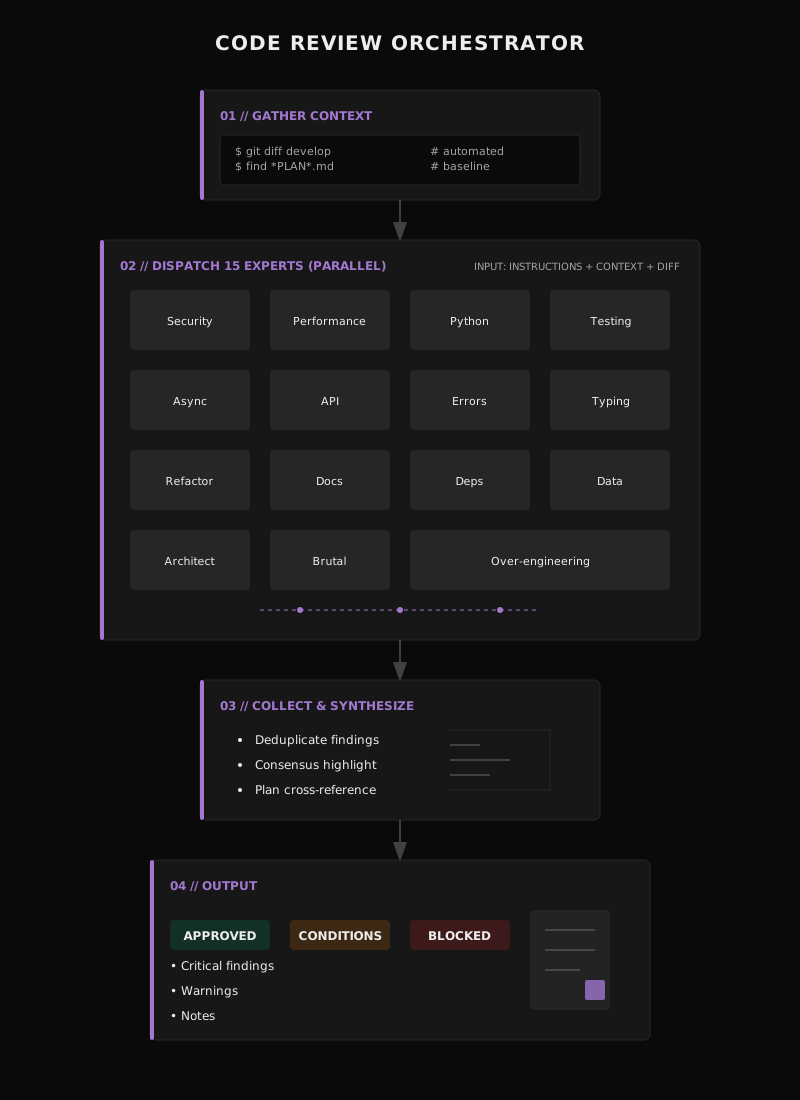
Here's what our expert review system looks like now:
Part 12: Try It Yourself
-
Pick 5 experts to start:
- Security (catches dangerous stuff)
- Performance (catches expensive stuff)
- Testing (catches missing coverage)
- Architecture (catches structural issues)
- Brutal (gives honest grades)
-
Write expanded prompts (~200 words each):
- Define the expert's perspective
- List what to look for
- Specify output format
- Include grading rubric
-
Add plan context:
- Before reviewing a planned feature, find the design doc
- Include it in every prompt
- List key decisions that shouldn't be flagged
-
Run in parallel:
- Use background tasks if your AI supports them
- Or fire sequential calls (slower but works)
-
Synthesize manually at first:
- Read all outputs
- Look for multi-expert agreement
- Cross-reference against plan
- Eventually automate this step
Starter prompts to steal (adapt to your stack):
Security Expert
You are a senior security engineer. Assume this code will be attacked.

Look for:

- Injection (SQL, command, path, template)
- Auth bypasses, missing permission checks
- Secrets in code, logs, or error messages
- Unsafe deserialization (pickle, yaml.load, eval)
- Missing input validation or output encoding

Output format:
🔴 CRITICAL: [issue] at [location] - [exploit path]
🟡 WARNING: [concern] - [potential vector]
🟢 NOTED: [observation]

Grade: F (actively exploitable) to A+ (exemplary)
Brutal Reviewer
You are the most demanding code reviewer. Trace through every line.

For each function:

1. State what it's supposed to do
2. Trace the logic step by step
3. Identify ANY way it could fail
4. Grade: F, D, C, B, A, A+

Be harsh. "Works" is not enough. Is it correct? Maintainable?
Tested? Would you trust this code with production data?

Final verdict with overall grade and top 3 concerns.
Over-engineering Detector
You detect unnecessary complexity. Your enemy is premature abstraction.

Flag if you see:

- Abstractions with only one implementation
- Parameters that are never used differently
- "Extensibility" that will never be extended
- Patterns that add indirection without value
- Complexity not justified by requirements

IMPORTANT: If design docs are provided, patterns called for
in the design are NOT over-engineering. Only flag complexity
that exceeds the stated requirements.

Output: List of YAGNI violations with suggested simplifications.
Closing
The 15-expert panel isn't about replacing human reviewers—it's about augmenting them. Humans are still better at understanding intent, questioning requirements, and catching the truly subtle bugs that require deep domain knowledge.
But for the mechanical stuff? The "did you remember to check for null?" and "is this O(n²) on purpose?" questions? Let the machines handle it.
The system has two parts, and both matter:
- The panel: 15 specialists reviewing in parallel, each with their own perspective
- The context: Design documents that tell the AI why the code looks the way it does
Without the context, you'll catch real bugs—and drown in false positives. With it, you get signal.
Your senior engineers' time is too valuable to spend on checklists. And your AI reviewers are too dumb to understand intent without help.
Build the panel. Include the context. Let them work together.
What's your experience with AI code review? I'd love to hear what's worked (or spectacularly failed) for you.